
Know every day what your developers deliver — humans and AI agents.
Plug your GitHub, GitLab or Bitbucket in read-only. The dashboard tracks what your developers and your AI agents deliver, and weekly, monthly and quarterly reports tell the story in dev-days, with what's blocked. That's it.
Read-only · 10-min setup · No credit card · Free during early access
Using it in production (first circle)





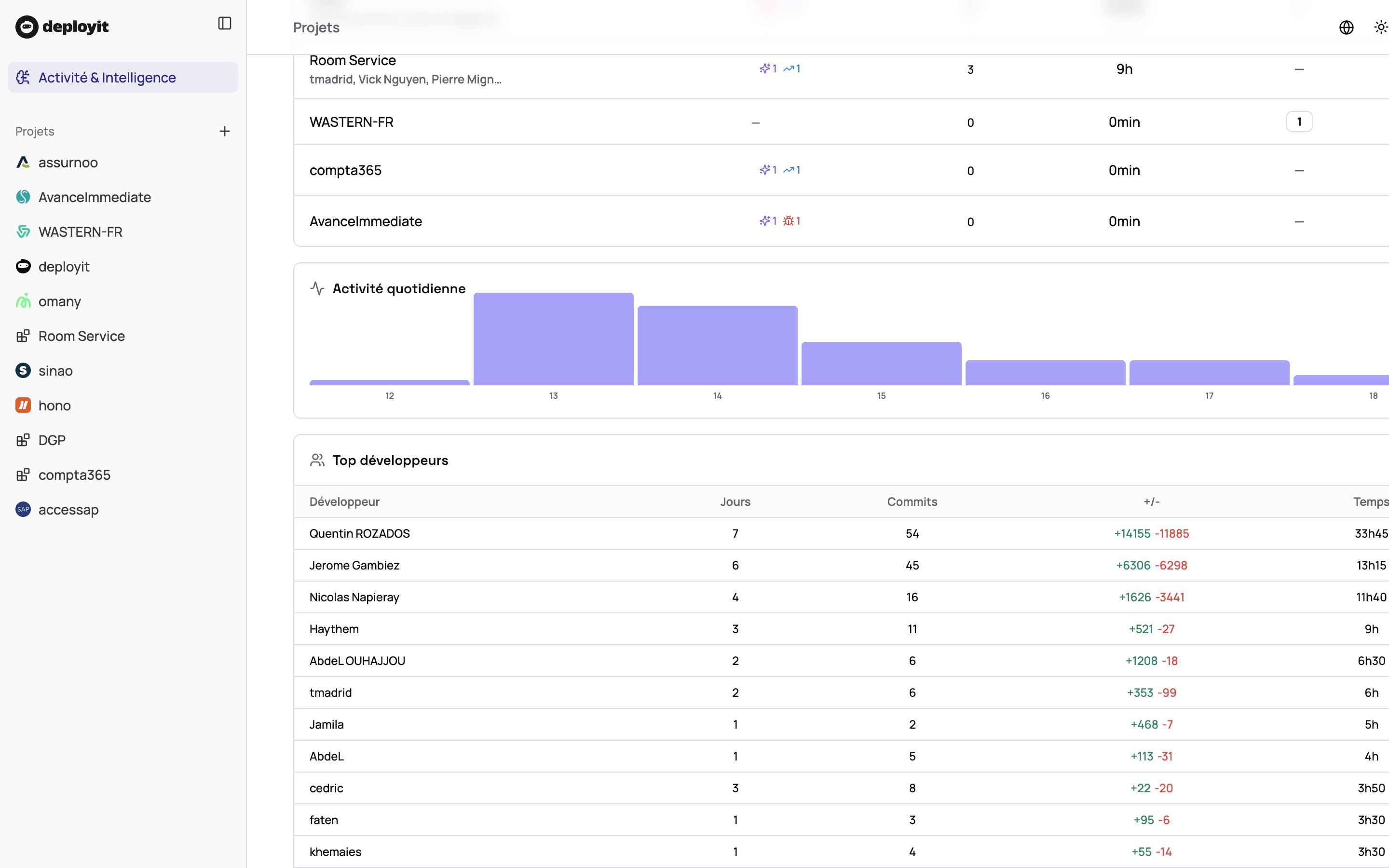
You have a dev team. You have no day-to-day visibility.
CEO, COO, CPO, CTO, head of product, project lead — you all share the same blind spot: what happens between two demos. And every attempt to fill it — stand-ups, Jira, pinging the tech lead — costs the whole team time.
You discover topics in meetings, not before
Monday stand-up, sprint review, bi-weekly demo: in between, you move blind. By the time a topic surfaces, it’s either shipped or late.
A topic needs arbitration — you have to ping the team for context
Every “where are we?” blocks two people for 30 minutes. Multiplied by every topic, every week, it’s full days lost — and a signal of distrust you don’t want to send.
You have to report progress — and have nothing clean to show
Steering committee, board, rebilled client, internal sponsor: you owe them proof of progress. Today it lives in your tech lead’s head or a slide hacked together the night before.
Three steps. None ask anything of your team.
No webhook to configure, no CI to modify, no tool to learn. The repo is read in the background. Your devs notice nothing.
Connect your repo
OAuth GitHub, GitLab or Bitbucket. Read-only, no write scopes. Private, monorepo, polyrepo — all supported.
Choose who sees what
Full view for you, project view for project managers, shareable view for a client. Nobody sees what they shouldn't.
DeployIt runs in the background
Every push feeds the dashboard. Estimated output in dev-days, anomalies, summaries — all recomputed continuously, no action needed.
Get your reports
Weekly to steer, monthly and quarterly for the board or a client: who delivered what, how many dev-days, what's blocked. You open the dashboard only when you want to dig in.
Here's what DeployIt shows you.
One email, read in two minutes. Four things you'll find nowhere else with this level of clarity for a non-tech.
Dev activity tracking
Who delivered what, how many dev-days, what's blocked.
Everything written in business language: "Checkout v2 shipped", "payment bug fixed", "refactor in progress". No Git jargon, no PR tables, no DORA. Readable by you, your co-founder, your clients.
- Email reports: weekly, monthly, quarterly
- Real-time dashboard when you want to dig in
- AI estimate of output in dev-days per project
- Detection of stale PRs and bottlenecks
- AI share of the work and human vs AI quality (Claude Code, Cursor, Copilot…)
- Shareable view for a client, co-founder or partner
Business-language summary
"Checkout v2 shipped" instead of "PR #1284 merged".
Estimated output in dev-days
AI estimates what was produced, per feature and per developer — in dev-days. 1 dev-day ≈ 5 hours of focused work: a real day of development, thinking included.
Detected anomalies
Stale PRs, refactors dragging on, emerging bottlenecks — surfaced automatically.
AI agents tracked
Claude Code, Cursor, Copilot, Devin, Codex… AI share of the work, quality scored on the same scale as humans, agent PRs merged without human review flagged. An agent that produces 2 dev-days in a single day — you see it.
AI agent code stays under your control.
Per-project rules, clear alerts. DeployIt is read-only: it warns you, it never blocks your team.
Human review on agent code
An agent PR merged without human approval is detected and flagged — on GitHub, GitLab and Bitbucket.
AI share threshold per project
Set the AI share you consider healthy. If it's exceeded for the day or the period, you get alerted.
Main branch watched
An agent committing straight to the main branch, without a PR, triggers an alert.
The DeployIt angle: we measure AI agents thoroughly, we never monitor your developers individually. Agents are held accountable. Your team keeps its trust.
You won't have to choose between bothering the team and deciding blind.
Today, to know what your devs do, you have three options. None of them really works.
One price. All features. No surprises.
Everything is free during early access. Paid plans start in January 2027, billed per active developer — the people actually pushing code, not your bots or inactive seats.
Free
Free during early access — every repository, no volume limit.
- Unlimited repositories
- Unlimited commits processed
- Weekly, monthly and quarterly reports
- Real-time dashboard + AI-agent tracking
- GitHub, GitLab, Bitbucket
Pro
For teams (in-house or agency) who want continuous tracking.
- Unlimited commits
- Weekly, monthly and quarterly reports + real-time dashboard
- Estimated output in dev-days & anomaly detection
- Shareable views (client, partner, investor)
- PDF export of project reports
- Help Center & AI Messenger (beta) included
- Priority email support
Enterprise
For organisations with strict requirements.
- Everything in Pro
- SSO & SCIM
- Self-hosted / VPC deployment
- Dedicated EU hosting, SOC 2 Type II
- DPA, AI-training opt-out
- Dedicated support & SLA
Best for: internal teams 2–50 devs, agencies & dev shops needing client reporting.
Also included: your Help Center and AI Messenger, generated from the same repo.
A module in beta, shipped free with your Pro account. If you only want to steer your team, ignore it. If you have a product to explain to users, take a look — it's wired to your code, not to a wiki.
- Auto-generated public site (landing, docs, guides, changelog)
- AI Messenger that reads your code and qualifies real bugs
- Custom domain, multilingual, 9 languages
The questions you ask before plugging in your repo.
Can DeployIt access my code? What does it see exactly?
Will my developers feel watched?
What about AI coding agents (Claude Code, Cursor, Copilot, Devin)?
Concretely, how is this different from Swarmia or LinearB?
What's the "Help Center beta" mentioned at the bottom?
Is the free plan really unlimited?
10 minutes now. The dashboard tonight, your first report on Monday. You decide.
Free plan, no credit card. Read-only. No action required from your team.
Free plan · No CC · Read-only · Hosted in EU